
Small Business Recurring Cost Register
Every software seat, policy, lease and fee the business pays on repeat, with its owner, payment method, next charge and notice date.
These images are illustrations of the concept, not screenshots of the actual product.
Overview
This concept illustrates a register of recurring costs sized for an owner-led business. It keeps software seats, the booking system, shop insurance, the workshop lease and the card-terminal rental in one list, and for each cost shows who owns it, which card or account pays it, the monthly equivalent, the next charge and the date by which notice must be given.
For small businesses and startups, recurring costs spread quietly. A tool is bought on someone's personal card, two people sign up for similar design apps, a seat keeps renewing after the person using it has left, and an insurance renewal or lease notice date passes before anyone looks. Software trackers tend to miss the lease and the terminal rental, and the books see charges only after they land. The concept adds three things to Subscriber Bot's subscription and savings views: costs beyond software in the same list, a flag for costs paid on a personal card, and a seat check against staff who have left.
The illustrated Recurring costs page sits under Relationships in a business workspace, with an Add cost button and filters for category and paying method. Four tiles show the monthly equivalent, the amount due in the next 30 days, costs that need a decision and costs on a personal card, the last two highlighted. The register lists each cost with its category, paying method, owner, monthly equivalent, next charge, notice date and a flag. Sample flags mark an annual shop insurance policy as renewing in 19 days, two similar design tools as duplicates, one of them on a personal card, the booking system as carrying a seat for a leaver and the card-terminal rental as having an annual plan available. The workshop lease shows its notice date. Selecting the booking system opens a panel comparing seats paid with staff using it, with Remove seat and Ask owner actions.
Three other Burdenoff products appear in the design. The panel holds a CrewFoundry card showing that a staff member left and when, reflecting the intent that CrewFoundry's staff records drive the seat check. A strip below it notes that upcoming charges are sent to BigConsole via FluidGrids at a set morning time: upcoming charges are designed to pass through a FluidGrids workflow to BigConsole's cash view.
Within Subscriber Bot, the register extends relationship and renewal tracking to every recurring cost a small business carries, and decisions to cancel or merge duplicate tools are designed to use the product's cost optimization view.
What this concept shows
- Tiles for the monthly equivalent, the amount due in the next 30 days, costs needing a decision and costs on a personal card
- Filters for category and paying method
- One register for software, insurance, rent and payment costs, with owner, paying method, next charge and notice date
- Flags for upcoming renewals, duplicate tools, seats for leavers and available annual plans
- Costs paid on a personal card listed alongside business-card, bank-transfer and payout-deducted costs
- A seat panel comparing seats paid with staff using the tool, with Remove seat and Ask owner actions
- Leaver data from CrewFoundry and upcoming charges sent to BigConsole via FluidGrids
How it works
- Open Recurring costs under Relationships in the business workspace and add any missing cost.
- Read the monthly equivalent, the amount due in 30 days and the counts needing a decision or on a personal card.
- Filter by category or paying method and scan each cost's next charge and notice date.
- Open a flagged cost, such as the booking system with a seat for a leaver shown by CrewFoundry.
- Remove the seat or ask the owner, and settle duplicates in the cost optimization view.
- Let upcoming charges flow through FluidGrids to BigConsole's cash view.
Who it's for
- Small business owners
- Startup founders and operators
- Office and operations managers
- Bookkeepers handling recurring bills
Illustrations
1 illustration of this concept. Select one to view it full size.
Recurring Cost Register With Flags and Seat Panel
This illustration shows a desktop page titled Recurring costs in a business workspace, under Relationships, with an Add cost button and filters for category and paid by. Four tiles show the monthly equivalent, the amount due in the next 30 days and, highlighted, the counts of costs needing a decision and costs on a personal card. The register lists each cost with category, paying method, owner, monthly equivalent, next charge, notice date and flag. Sample rows cover shop insurance renewing soon, a booking system flagged for a leaver, two design tools flagged as duplicates, one on a personal card, a workshop lease paid by bank transfer with a notice date, and a card-terminal rental with an annual plan available. A side panel for the booking system compares seats paid with staff using it, shows a CrewFoundry card for a staff member who left, offers Remove seat and Ask owner, and notes upcoming charges go to BigConsole via FluidGrids. All figures are sample data.
Topics
- small business recurring costs
- subscription tracker for small business
- recurring expense register
- unused software seats
- duplicate software subscriptions
- business costs on personal card
- lease notice date reminder
- remove seats when staff leave
- startup cost tracking
- upcoming business charges
Related concepts
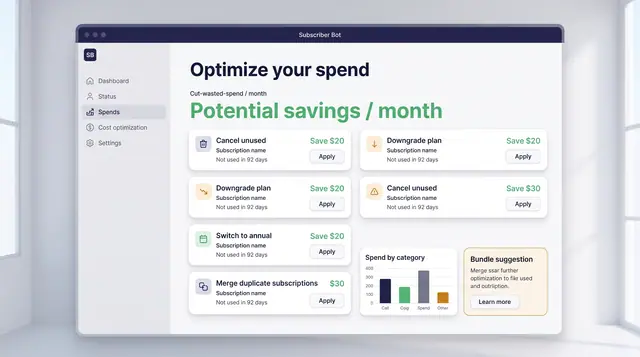
Spend Optimization and License Utilization
Turn portfolio data into decisions: cancel what is unused, downgrade what is oversized, and find the seats you are paying for twice.
2 illustrations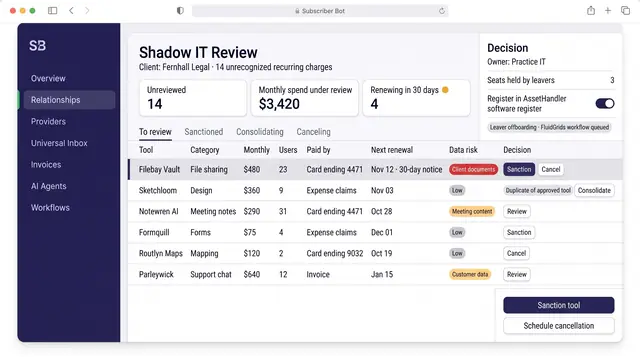
Shadow IT and SaaS Intake Review
Turn unrecognized recurring charges into reviewed decisions to sanction, consolidate or cancel, each with an owner and a renewal date.
1 illustration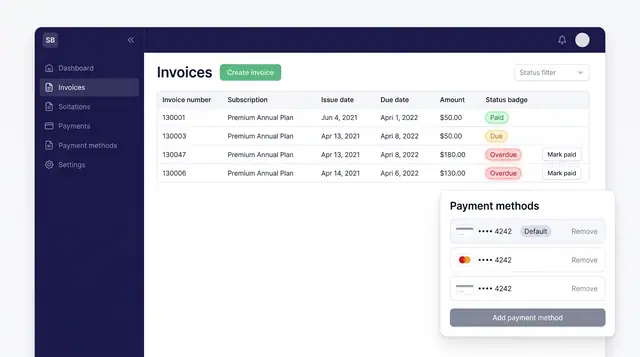
Invoices and Payment Methods
Track every subscription invoice by status and keep the cards that pay for them in one place, with a clear default.
1 illustration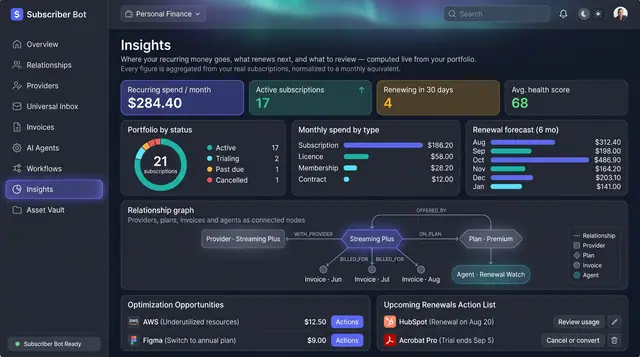
Portfolio Insights and Renewal Forecast
Recurring spend, portfolio health and the next six months of renewals, computed from your own subscriptions rather than typed in.
2 illustrations
Part of an industry solution
This concept appears in a cross-product solution on burdenoff.com — see how it works alongside other Burdenoff products to solve a problem in that industry.